How to Increase the Java Applet Memory Limit
|
Java 7 UPDATE: Java 7 dramatically increases the memory limit, so this fix may
not be needed, if you know Java 7 will be used.
Java 6 UPDATE: Java 6 Update 10 (and later) allows an
HTML programmer to set the maximum java applet memory via an <applet> param.
Sun reference.
The param name
is java_arguments and the value looks like -Xmx400m. Please note
that this solution requires (1) the client computer to be running Java 6 Update 10
(or later), and (2) the HTML programmer to use this new applet param.
|
Problem: The Java plugin in your web browser has run out of memory
Cause: The memory limit for the Java plugin is usually around 60-90 MB
Solution: Increase the Java Applet memory limit (see steps below)
|
- First, make sure that you are running the most recent version of Sun's Java (1.6),
which has memory improvemements (and security updates) over prior Java versions.
Installing Java 1.6 along may fix your out of memory errors.
How to install Java 1.6 now.
--- The following instructions assume Java 1.6 is already installed ---
- Click on 'Start'

- Click on 'Control Panel'

- Double click on the 'Java Plug-in' icon (which may be under 'Other Control Panel Options').
 
- Select the 'Java' tab and click on the 'View...' button, under the
'Java Applet Runtime Settings' section.
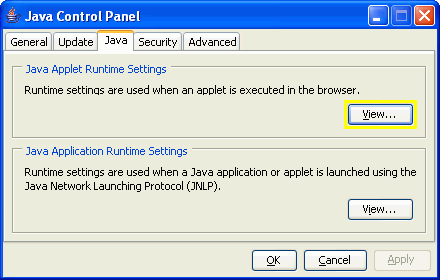
- Find the most recent 'Version' Java runtime line (below: 1.5.0_06 is more
recent than 1.5.0_05) and double click on the 'Java Runtime Parameters'
box and add "-Xmx300m"
(set Java maximum heap size to 300 MB) as you see below.
For some unknown reason, some computers with large amounts of installed memory
are limited to how much memory they can assign to their Java VM. If you experience problems,
just reduce the "300" to some smaller number (like 250, 200, 150, etc)

- Click 'OK' to exit all dialogs. Close the control panel window.
- Important: Exit ALL web browser windows.
|
